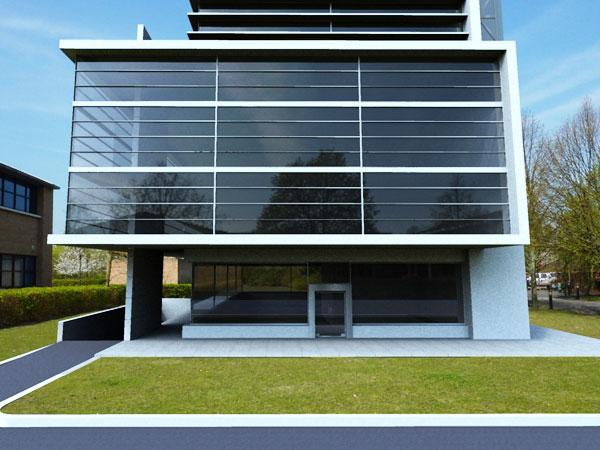
Google Sketchup supports multiple plugins. One of the latest plugins of sketchup is Shaderlight. This item is responsible to turn your sketchup designs into a photorealistic image.
Any type of user, no matter if he is novice or an experienced person, can use sketchup with an ease with the help of shaderlight. As it is fully integrated with Sketchup, user can see their rendered image develop with each updating of change to any sketchup scene.
Checkout some images created by shaderlight, here: http://www.sketchup4architect.com/image_show/images/Sketchup_plugins_image/large/shederligh_plugin_for_sketchup_1.jpg
http://www.sketchup4architect.com/image_show/images/Sketchup_plugins_image/large/shederligh_plugin_for_sketchup_2.jpg
Now you can download the trial version here:
http://www.artvps.com/content/download/sketchup
Showing posts with label 2D Google Maps. Show all posts
Showing posts with label 2D Google Maps. Show all posts
Friday, January 28, 2011



Friday, August 27, 2010
Street View Imagery added to Building Maker
Google recently create some vital updates for Building Maker. From now one can add street view photos to texture the sides of your buildings model. With this new feature the buildings will look much better in a higher resolution and with more realism. One is also able to use imagery directly from Street View on Google Maps!
Besides the new updates, Building Maker is now available in six new cities:• Edinburgh, United Kingdom• Florence, Italy• Vienna, Austria• Pittsburgh, PA, United States• Santa Cruz, CA, United States• Riverside, CA, United States.
MORE.............
Besides the new updates, Building Maker is now available in six new cities:• Edinburgh, United Kingdom• Florence, Italy• Vienna, Austria• Pittsburgh, PA, United States• Santa Cruz, CA, United States• Riverside, CA, United States.
MORE.............
Monday, August 16, 2010
Google Earth Enterprise 4.0
Google team has released Google Earth Enterprise 4.0 (GEE 4.0) with some new features convenient for the enterprise environment. With this new release all geospatial data will be exposed publicly with GEE.
GEE 4.0 introduces a new feature that facilitates authenticated end users to download the required data from the cloud as well as all imagery, terrain, vectors, KMLs and search -- and supply the data locally from their own laptops or other storage devices by means of a native, cross-platform, light-weight Portable Earth System.
GEE lets you create 2D Google Maps or 3D Google Earth globes with the accessible GIS system to add value to the stored data. GEE creates a network for terabytes of imagery and terrain data, vector layers with to your POI, road data and live data streams.
GEE comes with mobile client for Android devices to connect to the enterprise data set based on the regular Google Earth app obtainable in the Android Marketplace to provide direct connections to the customers’ globes for getting a view of their organization's 3D globe.
GEE provides mobile based access to Google Earth data in situations where an internet connection is unavailable to users. The users will be in a position to
GEE also support new Earth 5.2, with its features, like elevation profiles, native MGRS support, client-side data regionation, and new embedded web-browser.
Rajib Dey
sketchup4architect sketchup library sketchup download
GEE 4.0 introduces a new feature that facilitates authenticated end users to download the required data from the cloud as well as all imagery, terrain, vectors, KMLs and search -- and supply the data locally from their own laptops or other storage devices by means of a native, cross-platform, light-weight Portable Earth System.
GEE lets you create 2D Google Maps or 3D Google Earth globes with the accessible GIS system to add value to the stored data. GEE creates a network for terabytes of imagery and terrain data, vector layers with to your POI, road data and live data streams.
GEE comes with mobile client for Android devices to connect to the enterprise data set based on the regular Google Earth app obtainable in the Android Marketplace to provide direct connections to the customers’ globes for getting a view of their organization's 3D globe.
GEE provides mobile based access to Google Earth data in situations where an internet connection is unavailable to users. The users will be in a position to
GEE also support new Earth 5.2, with its features, like elevation profiles, native MGRS support, client-side data regionation, and new embedded web-browser.
Rajib Dey
sketchup4architect sketchup library sketchup download
Subscribe to:
Posts (Atom)