Showing posts with label AutoCAD Drawing. Show all posts

Monday, May 7, 2018

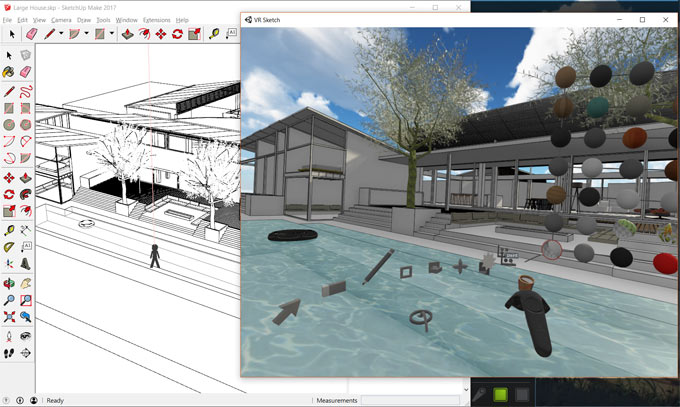
VR Sketch – A new wing has been added to extension warehouse

Maciej F is the developer of the newest sketchup plugin alias VR Sketch. It is well matched with sketchup 2017 and sketchup 2018. It is only compatible with windows platform.

It can be used for editing and visualizing architectural models from SketchUp in virtual reality. HTC Vive with SteamVR installed should be necessary for present setup.-
The trial version of the plugin functions for 2 weeks. After that a paid version is required with free access for 2 weeks.
The current version allows the users to view and edit directly in VR and the users can use it to deal with large models. The link from SketchUp files is instant and it is possible to edit both on the monitor and in the VR simultaneously.
The present version is not intended for photo realism and rather features on having a cartoonish but well performing mode that allows you to edit SketchUp files 100s of megabytes in size.
To get more information, go through the following link vrsketch.eu
~~~~~~~~~~~~~~~~~~~~~~~~~~
Published By
Rajib Dey
www.sketchup4architect.com
~~~~~~~~~~~~~~~~~~~~~~~~~~

Wednesday, February 28, 2018

nz_MyCatalogue helps to create your own parametric library of extrudable profiles

Natale Zappia has developed nz_MyCatalogue, the newest sketchup extension that supports SketchUp 2016, SketchUp 2017, SketchUp 2018.

This sketchup extension is very useful for various industries like Architecture, Construction, Education, Engineering, Film & Stage, Gaming, Heavy Civil, Interior Design, Kitchen & Bath, Landscape Architecture, Urban Planning, Woodworking etc.

nz_MyCatalogue facilitates the users to make their individual multifaceted parametric library of extrudable profiles.

Alike sketchup, nz_MyCatalogue facilitates to produce profiles ranging from as little input as

Profile Name
Width
Height
or through to the formation of complicated custom profiles


Apart from, it is also possible to add different parameters like:

DIRECTIONAL offset... Spacing elements at selected centers (adjustable to Centerline or Face offset)
LATERAL offset.... Assign spacings among wall elements (adjustable to Centerliine)
VERTICAL offset: eg overhead cupboards (adaptable to top face or underside measurements)
Overall Length limits
Custom colour of your own conception


At any point the parameters can be
overridden
updated or
temporarily created upon selection of the profile.
It is possible to select for each resultant object to either be a
group or
component
eitherway the object has drawn instances containing:
Instance names similar to it's library name
Similar axes corresponding to the object itself, it signifies that one can simply unite groups while transforming them into components (also refer to nz_ConvertMe).
This sketchup extension is available in extension warehouse extensions.sketchup.com
Watch online demonstration of the plugin.

~~~~~~~~~~~~~~~~~~~~~~~~~~
Published By
Rajib Dey
www.sketchup4architect.com
~~~~~~~~~~~~~~~~~~~~~~~~~~

Wednesday, January 24, 2018

Developing a table in SketchUp

Tim Killen has wrote a wonderful eBook on woodworking and the in every chapter of the book there is a modeling detail of a piece of furniture like table, window, door etc. The book is named as “SketchUp Guide for Woodworkers” and the details are described there with tutorial videos and descriptions.

In the ninth chapter of the eBook, Tim has described the process of creating a nice Chamfered Post Table; it is a 1700 model and is one of the famous pieces made by Wallace Nutting in his Book “Furniture Treasury”. Tim has named the chapter nine “How to Begin and Develop a piece of Furniture” in SketchUp which is a very good sample to start and grow the original woodworking used in workshops.

Using SketchUp for modeling is actually a good idea as it will give a furnished draft of the original model which will be followed in time of original working in workshop.

Tim’s eBook is full of detailed and understandable steps with many still pictures, texts and tutorial videos. In his ninth chapter he started making the Table from developing and sketching the main structures like legs, stretches, sides and backside etc. and all the four edges of the legs are unique here called chamfers. These unique chamfers are closed with a flat triangular finish which gives the legs a mix look of old and classic with uniqueness.

In real without perfect planning or sketching, making these chamfers is not an easy job but in SketchUp, chamfers are started to making from one leg component and at last it ends by making all the four sharp and designed legs. Tim used various tools in SketchUp to give the chamfers their perfect look.

Article Source: finewoodworking.com

Developing a table in SketchUp


~~~~~~~~~~~~~~~~~~~~~~~~~~
Published By
Rajib Dey
www.sketchup4architect.com
~~~~~~~~~~~~~~~~~~~~~~~~~~

Wednesday, January 17, 2018

nz_Edge2Polygon – The newest sketchup extension

Natale Zappia develops nz_Edge2Polygon, the newest sketchup extension that is available in extension warehouse. It generates polygons by maintaining perfect reference edge lengths.

This extension is compatible with SketchUp 2016, SketchUp 2017, SketchUp 2018. The plugin is ideal for enhancing your drawing and productivity.

nz_PolyhedralJuctions also comprises of nz_Edge2Length and also provides more complicated operations. Here n denotes nth number or sides.

To download the extension, go through the extension warehouse extensions.sketchup.com

nz_Edge2Polygon – The newest sketchup extension

~~~~~~~~~~~~~~~~~~~~~~~~~~
Published By
Rajib Dey
www.sketchup4architect.com
~~~~~~~~~~~~~~~~~~~~~~~~~~


Tuesday, January 9, 2018

nz_Scale&Align for sketchup

Natale Zappia has developed nz_Scale&Align, the newest sketchup plugin available in extension warehouse. It is a paid extension. The plugin is compatible with SketchUp 2016, SketchUp 2017, SketchUp 2018.

The plugin is suitable for Architecture, Construction, Education, Engineering, Film & Stage, Gaming, Heavy Civil, Interior Design, Kitchen & Bath, Landscape Architecture, Urban Planning, Woodworking, Other.

nz_Scale&Align comes with four operations "Scale, Align, Relocate and Copy" and the users can modify them as per their choice into a singular action and perfectly accomplish through relative source and destination points on-screen..

Given below, some exclusive features of the plugin
Scale Factor
- Scale objects with scale factor
Relative Scale

- Alignment 3D
- Adjustable Settings
+ Leave in Place or Relocate Original
+ Create a Copy


- Inbuilt 6 point "Alignment Verification"
+ With Pop-up Notification in case of any misalignment
- Visual Guides and Semi-Automated Flow Sequence for ease of use
- Text Overrides.
- Right Click Cancel/Exit/Cleanup
- RememberMe (Selectable Option): Settings are retained for the extent of the session and/or among sessions
- Commands are available from Menu(Tools), RightClick(on Valid Selection) and Toolbars


To download the extension, go through the following link extensions.sketchup.com

~~~~~~~~~~~~~~~~~~~~~~~~~~
Published By
Rajib Dey
www.sketchup4architect.com
~~~~~~~~~~~~~~~~~~~~~~~~~~