Showing posts with label Rendering SketchUp. Show all posts

Monday, May 7, 2018

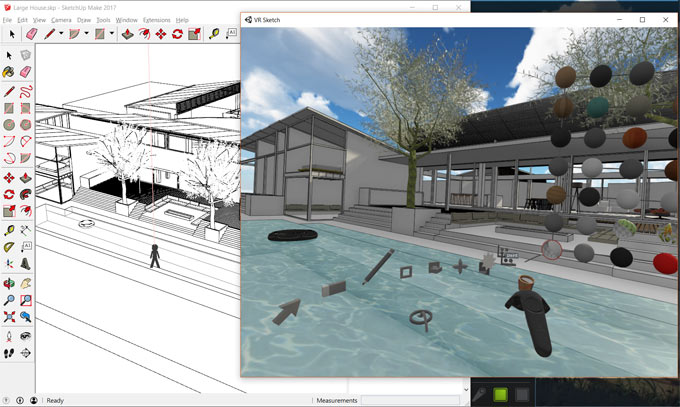
VR Sketch – A new wing has been added to extension warehouse

Maciej F is the developer of the newest sketchup plugin alias VR Sketch. It is well matched with sketchup 2017 and sketchup 2018. It is only compatible with windows platform.

It can be used for editing and visualizing architectural models from SketchUp in virtual reality. HTC Vive with SteamVR installed should be necessary for present setup.-
The trial version of the plugin functions for 2 weeks. After that a paid version is required with free access for 2 weeks.
The current version allows the users to view and edit directly in VR and the users can use it to deal with large models. The link from SketchUp files is instant and it is possible to edit both on the monitor and in the VR simultaneously.
The present version is not intended for photo realism and rather features on having a cartoonish but well performing mode that allows you to edit SketchUp files 100s of megabytes in size.
To get more information, go through the following link vrsketch.eu
~~~~~~~~~~~~~~~~~~~~~~~~~~
Published By
Rajib Dey
www.sketchup4architect.com
~~~~~~~~~~~~~~~~~~~~~~~~~~

Tuesday, February 6, 2018

IthilRenderTools v3.0.1 - A new sketchup extension in extension warehouse

Anton A has developed IthilRenderTools v3.0.1. This newest sketchup extension is compatible with SketchUp 2017, SketchUp 2018.

The extension will be very useful for the various types of industries like Architecture, Film & Stage, Interior Design, Landscape Architecture and other.

The plugin can be used to improve the performance of v-ray render significantly.

By using this extension, it is possible to generate most of the simple materials with just simple mouse clicks. Besides, all equivalent materials which contain various colors are grouped and tagged and become usable with simple mouse clicks.

As for instance, if you want to arrange various types of materials like all plastic toys in kids room, all books, pencils on the desk, all magazines and etc., just use this plugin to set up them automatically devoid of any issues.

This plugin also contains a block of scene materials analysis and one can also look for improper materials with incorrect textures.

This extension is available in extension warehouse extensions.sketchup.com

Watch the following video tutorial for online demonstration.


~~~~~~~~~~~~~~~~~~~~~~~
Published By
Rajib Dey
www.sketchup4architect.com
~~~~~~~~~~~~~~~~~~~~~~~

Tuesday, January 30, 2018

Demo of 3D Offset, the newest sketchup extension

Wisext released 3D Offset, the newest sketchup extension that is used to offset various faces at several distances. The users can now offset surfaces in 3D.

The extension is compatible with SketchUp 8, SketchUp 2013, SketchUp 2014, SketchUp 2015, SketchUp 2016 and SketchUp 2017.

In order to apply it, just press a single button to begin the tool. Choose or deselect the faces and put the distances segregated by "-". Get the preview the offsetted faces. Press Enter to generate them.


Now, go to window tab and click on default tray and check all the trays on the right hand side are selected.
To get more updates, go through the following link www.wisext.com
Watch the following video tutorial to get online demonstration of the extension.

~~~~~~~~~~~~~~~~~~~~~~~~~~
Published By
Rajib Dey
www.sketchup4architect.com
~~~~~~~~~~~~~~~~~~~~~~~~~~

Monday, November 13, 2017

Bezier Surface of Revolution – newly launched sketchup plugin in extension warehouse

Jacob Samuel has developed Bezier Surface of Revolution. This newest sketchup plugin supports SketchUp 2015, SketchUp 2016, SketchUp 2017, SketchUp 2018. The plugin can be used for numerous sectors like Architecture, Construction, Education, Engineering, Film & Stage, Gaming, Heavy Civil, Interior Design, Kitchen & Bath, Landscape Architecture, Urban Planning, Woodworking etc.


This extension is applied to generate generate and edit Bezier surfaces of revolution with the use of Bezier curves, arcs, circles & lines as the profile.
This extension includes items to the Right Mouse Button Context as well as Draw and Edit menus with tools to generate and edit different types of surface of revolutions including spheres, hemispheres, domes, cones, torus etc.

The draw tool, "Bezier Surface of Revolution", is available in the Right Mouse Button Context and Draw menus on choosing a Bezier curve(nonrational or rational), arc, circle or line on the XZ/Red Blue/Front/Back plane as the profile curve. As soon as the surface is formed, the tool brings you in the editing tool for the surface drawn afresh.


If required, the surface will be editable for customizing it according to your choice by shifting the points or lines of the resulting control net or modifying the "weights" of the control points. The edit tool will be turned on subsequently by choosing the surface and "Edit Rational Bezier Surface" from the Right Mouse Button Context or Edit > Group menu.
Download the extension from the extension warehouse extensions.sketchup.com

Bezier Surface of Revolution – newly launched sketchup plugin in extension warehouse

~~~~~~~~~~~~~~~~~~~~~~~~~~
Published By
Rajib Dey
www.sketchup4architect.com
~~~~~~~~~~~~~~~~~~~~~~~~~~

Wednesday, October 11, 2017

SketchUp Rendering with V-Ray 3 – An exclusive online course by Brian Bradley

Brian Bradley has presented an online training on Sketchup V-ray 3. V-Ray 3 for SketchUp highlights interactive rendering technology that facilitates you to view results instantly when modifications made to the model.

In this online video tutorial, Brian Bradley provides useful suggestions on how to apply the tools and features available in the powerful V-Ray for SketchUp rendering solution. After shading light on the V-Ray interface, Brian briefly explains how to provide illumination to your scenes with the program’s multipurpose lighting tools.
He also demonstrates how to deal with various light types for including both artificial light and naturalistic daylight. Besides, he focuses on the V-Ray camera, materials, map types, render elements, FX tools, and more.
This online course covers the following topics
* Gamma handling in V-Ray 3 for SketchUp
* Working with interactive rendering
* V-Ray light types
* Working with irradiance mapping
* Rendering animations
* Working with the V-Ray camera
* Using the Materials UI
* V-Ray FX tools
* Stereoscopic 3D rendering
* Using V-Ray objects

To get more information on this course, click on the following link app4day.com

SketchUp Rendering with V-Ray 3 – An exclusive online course by Brian Bradley


~~~~~~~~~~~~~~~~~~~~~~~~~~
Published By
Rajib Dey
www.sketchup4architect.com
~~~~~~~~~~~~~~~~~~~~~~~~~~

Wednesday, September 13, 2017

Maxwell Rendering 4.1 for Smoother 3D Rendering

Now, 3D rendering is faster, easier and simpler with the Maxwell Rendering 4.1 version. With so many user-friendly options, it allows you to freely input your creativity and make your rendering the best one. The features offered by this new version are way ahead of the time. Whatever problems you have faced with the earlier version are completely eliminated on this platform. This high-end rendering tool does more than magic for the visualization software, and it definitely takes the artists and designer to a ride eight times smoother than they generally expect. Till now, the primary issue associated with the rendering tool is excessive rendering time. The new version promises to offer you an application where you can really enjoy your freedom having a complete control on designs. Let’s discuss in brief how the application helps designers.

Denoiser: Denoiser is a great tool that fades the noises of your designs and makes them crystal clear. The process reduces the time taken for erasing the noises. Denoiser is a powerful feature that understands your design and keeps the length and geometry details the same. Previously, you needed to render the image to a high sampling level. Now, it spins completely. Denoiser gives you the high-resolution images by keeping them low in size. This amazing feature is truly a revolutionary one.

GPU – Optimized handling memory: GPU helps in memory handling faster with a modern technique. If rendering process is cancelled because of having no sufficient memory, then Maxwell tiles the render and initiates the rendering process. This new version will allow you to render bigger images and scenes on the same GPU memory.

Maxwell Multilight 2 App:

A single render seems enough to your innumerable lighting variations and images added to the designs. It counts benefits more than you expect. The benefits are given below:

• Add light variations from your MXI files.
• Tone mapping and camera response features are also available.
• Setup lighting scenes as per your wish.
• A smart editing option is available that allows you to edit light before and after render.
• Prepare a lighting catalogue for your reference and clients’ needs

New Materials - Materials are available in huge quantity to guide you in designing process. These are selected attentively to help designers give the best result. The features are given below:

• Merl database material: 100 lab measured materials containing reflectance functions are collected in the segment. They are stored as the BRDF (Bidirectional Reflectance Distribution Functions).
• X-RiteAxF Materials: Appearance Exchange Format (AxF) files enhance the work on the visualization software. These materials have been used to store, transfer and digital materials of TAC Ecosystem.

Light panels: As the name says, it adds a dramatic touch to the design with offering an intense play of lights. You can modify and add lights as per your style.

Maxwell 4.1 version comes up with different features and functions that are way ahead of its other contemporaries. It offers an ultimate rendering option where difficult tasks become easier.


~~~~~~~~~~~~~~~~~~~~~~~~~~
Published By
Rajib Dey
www.sketchup4architect.com
~~~~~~~~~~~~~~~~~~~~~~~~~~

Wednesday, August 30, 2017

Sustainable Office Designer (SOD) – The newest sketchup extension

Ice Huli has developed Sustainable Office Designer (SOD). This sketchup extension supports SketchUp 2016, SketchUp 2017. It is very useful for low-rise steel composite buildings to create optimized primary structural design automatically on the basis of volumetric architecture design models.

The users have to install Windows.Net.4.6.1 to run the extension. Click on the following link to install it. www.microsoft.com

To get more information, click on the following link. www.metallbau.bgu.tum.de

Watch the following online demonstration.


Read more

~~~~~~~~~~~~~~~~~~~~~~~~~~
Published By
Rajib Dey
www.sketchup4architect.com
~~~~~~~~~~~~~~~~~~~~~~~~~~


Thursday, August 24, 2017

Building Creator – The newest extension available in extension warehouse

Neil Burkholder has developed the building creating extension called Building Creator for sketchup.
This newest extension is compatible with sketchup 2016 and sketchup 2017.
This newest sketchup extension is specifically design to simplify the process for creating design of garages and pole buildings. Presently, it performs as a drawing and visualization tool. No building plans or materials takeoff can be performed with this version.
One can utilize this extension to swiftly design and draw buildings so that the clients can visualize their building in an efficient manner. All modifications are sketched live.
Just click and opening, porch, wing, or dormer to edit it. Several openings (doors, and windows) can be changed simultaneously.
Building Creator can also be presented with Sketchup Make. The users can obtain the installer from the Extension Warehouse to set up a version with restricted functionality.


To obtain the code for a completely functional 14 day trial version, click on the following link forums.sketchup.com

Building Creator – The newest extension available in extension warehouse


~~~~~~~~~~~~~~~~~~~~~~~~~~
Published By
Rajib Dey
www.sketchup4architect.com
~~~~~~~~~~~~~~~~~~~~~~~~~~