Showing posts with label sketchup 3D printing plugin. Show all posts

Wednesday, May 14, 2014

Background Modification in Sketchup

Background Modification in Sketchup 

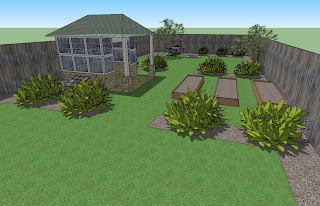
Here are the tips on how to change the background in SketchUp (not for render).
Usually when we want to present our SketchUp drawing to our client, it’s only a sky, isn't it? SO, with this way, we can change / customize our background so at least it will make our scene more real although it’s only a sketch without rendered.

If you want to render the scene (vray or podium or anything else render engine), then you should use HDRI or customize on Photoshop.

So, here is the step by step: 

1. Show the Styles window by accessing menu Window -> Style.

2. In window Style, choose tab "Edit", then choose "Watermark" from the menu

3. Click "(+)" icon then select a bitmap whatever you want to show for your background image, usually its a sky image or something else. The bigger the image size will make more smooth.

4. then, you will get a dialog question window, choose "Background". Then, "Watermark1" on the option can changed/renamed to whatever u want.

5. The next dialog, let the settings to the default, just click "Next".

6. Next dialog, choose "Positioned in the screen", then move the slider in the "Scale" to the right, This means our bitmap will strecthed fully. Thats why i suggest you use bigger image size so you will get smoother result.

7. Then, on the bullet icon, this means how the image repetition start. In this case, i select the bottom center. But you can select/try your own based on your image. Then, click "Finish"

Done.. ! ^_^ .. the parameter i mention above is not absolute, you can take your time to experience .. i hope this is useful for you ..
Background Modification in Sketchup  

Background Modification in Sketchup   

~~~~~~~~~~~~~~~~~~~~~
Published By
Arka Roy
www.sketchup-ur-space.com
~~~~~~~~~~~~~~~~~~~~~

Friday, January 17, 2014

SketchUcation Plugin Store v2.5.1

By applying SketchUcation Tools v2.5.0 the sketchup users can avail an extensive library formed with SketchUp Extensions and sketchup Plugins. This newly launched plugin store contains several advanced features to transform SketchUcation Tools to be the most desired extensions for SketchUp.

SketchUcation Tools is well versed with sketchup version 8 and sketchup 2013. It facilitates users to set up extensions and plugins into SketchUp with the PluginStore. The plugin store comprises of more than 800 plugins and extensions which are free for installation and application.

The sketchup users can access the following advantages from the plugin store:
  • Explore 800+ plugins and extensions for SketchUp**
  • Gather information, report bugs and contact directly with the author for any feature requests
  • Set up plugins or extensions directly into SketchUp through AutoInstall aspect.
  • Set up SketchUp plugins or extensions into custom folder locations.
  • Donate to the Author of a SketchUp plugin or extension
  • Control your installed SketchUp plugins and extensions
  • Save enabled/disabled 'Sets' of plugins or extensions
  • Uninstall plugins and extensions
  • AutoInstall a plugin from an 'Archive' (both ZIP and RBZ formats)
  • Toggle the visibility of the SketchUcation Toolbar
By undergoing Plugin and Extensions Managers the sketchup users can reconcile their SketchUp environment as per requirements. Identify what tools are requried on startup or for the time being load a tool for that particular session

With custom loadout defined the sketchup users can save these as 'Sets' for future. By uploading plugins and extensions into SketchUp, the sketchup users can eliminate avoidable items from their workspace and enhance their workflow.
With newly added ‘My set up’ to the SketchUcation Tools, the sketchup users can get superior control by apprehending any updates, set up and download per device.
It the sketchup users apply sketchup on diversified desktops as well as laptops then identifying their favorites among these will be more convenient.


~~~~~~~~~~~~~~~~~~~~
Published by Tuhin Maity
Sketchup Designer
www.sketchup4architect.com
------------------------------------

Thursday, May 10, 2012

Construction Model and 3D Building Design for Enhanced Construction

Sketchup is a wonderful tool for 3D designing. It is much faster and accurate than any other 3D designing tools available in the market. This magic tool from the house of Google helps the architects, designer, educators, game designer, film designer, graphic are designer, interior designer. Any general people can use this user friendly designing tool. 

3D building
This is success used by the school students for their project. Even the people with autism disorder can make beautiful model with the help of Sketchup. 3 dimensional model of any object like building, people, tree, car or any thing can be created promptly. 


3D building


Monday, February 21, 2011

SketchUp A New Aspect to the World of Art

If you posses a soul of the artist, now you can have a new assistance to fulfill your soul desire. You can create a artwork that obeys the laws of perspective with the help of none other than Google SketchUp. It is almost invaluable for illustration.

It’s a 3D modeling program which is extremely intuitive. It’s based on the idea of actually making things by drawing lines, so people who are comfortable with pencil and paper won’t find a sharp learning curve. Like any good graphics program, although it is easy to use, there is also a great deal of depth. You can do extremely complex things with SketchUp.

You can quickly and easily build something straight out of your imagination but you can also create 3D buildings or objects from 2D photos.

Once you’ve built your model you can use it for anything you like. Take a shot of it from any angle, change the field of view, etc. You can add textures and colours as well as pre-made elements like windows or trees.

You can print it out and use the squaring up method to transfer it to a drawing surface and incorporate it into your drawing or painting. Or make a loose sketch from the image on the screen. For digital work, of course you can export images and import them into Photoshop. You can even create your own perspective grids.

The thing that’s really great about SketchUp is that it’s FREE. Yes, free. There’s a professional version which does come with a price tag but it is astounding what you can do with the free version.

Thursday, September 16, 2010

i.materialise Sketchup 3D Plugin

The i.materialize company, renowned name in 3D printing service, just launched i.materialise Sketchup 3D Plugin. The plug-in can only be used with Windows version only. This plugin provides an easy way to transfer 3D sketchup models to object printing process. The users can customize, scale and order a 3D print and in color conserving all textures immediately from software program’s interface.

The plugin is very much useful for architect to create scaled or actual architectural models(scale models of a new house or redecorated interior models) and review their designs.

The i.materialise SketchUp plugin is freely downloadable. The monochrome or full colorized printed models are priced at €300/$350 and sized at 150 mm by 230 mm by 140 mm high (about 6 x 9 x 5.5 inches high)

Downloadable link
http://i.materialise.com/Tool/CreateYourArchitecturalModel

Posted By
Rajib Dey
for www.sketchup4architect.com