Showing posts with label Maxwell for sketchup. Show all posts

Monday, June 16, 2014

Mini film made ​​on Google Sketchup and a 3D printer

The small world of animation seen 3D printing with kindness. Gradually emerging projects and the web will quickly find themselves overwhelmed by the possibilities offered by these new tools of choice are 3D printers.
Amateurs and professionals of animation will be able to express themselves without having to deploy large financial resources .

Disney and Google with the animated film Blank Vynilmation Love Story, the musical clip Cut / Copy or last month, hypnotic work of this bear on stairs : Bears on Stairs are all feats that give 3D printing , its pedigree in the world of Stop Motion ( motion animation ).

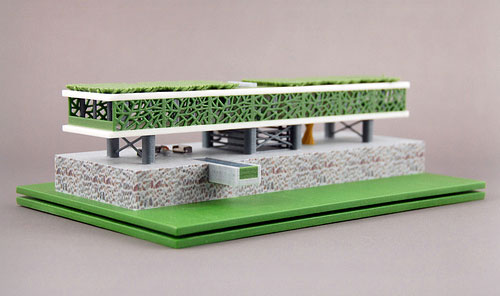
Today is " Paradise Found " created by Jon Patrick Barry and Jenny Chen is honored. All the accessories and the puppet present on the screen were modeled with Google Sketchup and are straight out of a 3D printer.
If you want to try 3D modeling and subsequently the animation , you can download Google Sketchup.

Mini film made ​​on Google Sketchup and a 3D printer  

Mini film made ​​on Google Sketchup and a 3D printer  

The Video Link is http://www.sketchup-ur-space.com/2014/april/mini-film-made-on-google-sketchup-and-a-3D-printer.html

~~~~~~~~~~~~~~~~~~~~~
Published By 
Arka Roy
www.sketchup-ur-space.com
~~~~~~~~~~~~~~~~~~~~~
 

Monday, May 19, 2014

Toolbar Editor 1.1.1 – An exclusive sketchup extension for making custom toolbars & buttons

Aerilius has developed Toolbar Editor for sketchup. This sketchup extension is compatible with SketchUp 8, SketchUp 2013, SketchUp 2014.

The plugin facilitates the sketchup users to make custom toolbars as well as buttons from any other plugin. The users can generate toolbars which have only buttons to be utilized in reality or integrate buttons from diverse plugins.

The sketchup users will be able to rapidly include new button for ruby commands and valuable code snippets devoid of transforming code into a plugin on its own.

Application:
  • Menu Window → Toolbar Editor
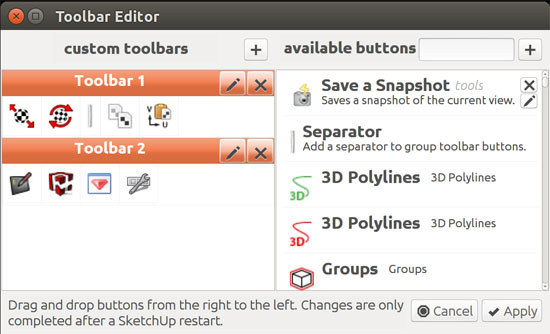
  • Select the "+" button situated at left side to generate a new toolbar. The name of the toolbar can be edited and the toolbar (“-” button) can also be eliminated.
  • Drag and drop items from the list of existing buttons to the left into a toolbar panel. The users will be capable of reorganizing the buttons, shifting them into other toolbars or taking out them by placing them out to the right. After making necessary modifications, press the apply button to save. All modifications will not be reflected instantly, some only on next start of SketchUp.
  • The users can sort out the list by providing some keys into the search field.
 Press the "+" button on the right for getting a new button. After that give your own Ruby commands or put  on a piece of Ruby code that is available on the forums.

The sketchup users can download it from the extension warehouse or sketchUcation forum.

Toolbar Editor 1.1.1 – An exclusive sketchup extension for making custom toolbars and buttons 
~~~~~~~~~~~~~~~~~~~~~
Published By
Arka Roy
www.sketchup4architect.com
~~~~~~~~~~~~~~~~~~~~~

Tuesday, May 6, 2014

New foldable smartphone that can take up a sketchup model and make it 3d printed

A researcher group from Canada has made the world’s first ever foldable smartphone alias PaperFold that can be transformed to a tablet and a notebook through a set of screens and hinges. The users can utilize the individual screen separately or as a solitary system.

The device can be customized as per the requirements of the users. As for example, it’s display can be folded inner to structure a phone as well as size can be folded outward for making the size bigger for reading maps, and it can be transformed to a makeshift laptop along with a keyboard.

This mobile gadget will be very useful for 3d modeling professional as well as sketchup users as it can provide the following benefits:-
  • This shape-shifting smartphone facilitates the users to bring in three flexible touschscreen displays. The users can straighten three displays and transform view to a Google map that covers all screens.
  • The users can present the map in Google Earth view by outlining PaperFold into a convex globe.
  • While positioning PaperFold into the form of a 3D building after viewing a map will take up a Google SketchUp model of the building and change the gadget into an architectural model to be 3D printed.
The developers do not the reveal that when the product will be ready for commercial application.
 
~~~~~~~~~~~~~~~~~~~~
Published By
Arka Roy
www.sketchup4architect.com
~~~~~~~~~~~~~~~~~~~~

Monday, May 5, 2014

SketchUp 2014 includes several BIM processes

In sketchup 2014, there exists an add-on tool alias LayOut which is compatible with a BIM (building information modeling) program.

Besides, Sketchup 2014 contains the classifier tool and IFC export capabilities. The 3d modeling professionals can now export out in indigenous file format through sketchup. IFC export of SketchUp facilitates the users to transfer any SketchUp files into various other tools like Solibri, the exclusive clash detection tools.

 The classifier tool allows the 3d modeling professionals to develop their models by metadata with the help of classifier tags to geometry, applying industry-standard object types ranging from walls, slabs, roofs and lots other.

The users can also produce or utilize supplementary classifying systems which contain gbXML and others along with custom schemas.

In earlier version of sketchup i.e. sketchup 2013, allows users to read native sketchup models through all the leading CAD/BIM programs like AutoCAD, Revit, ArchiCAD, Vectorworks, Microstation, TurboCAD and others.

By applying BIM, the users can alter the virtual building within the BIM and the documents (plans, elevations, sections) are revised automatically necessitating only inconsequential work through notes, note leaders and possibly dimensions.

In SketchUp 2014 there exits Auto-Text tags which can deal with page numbers, today’s date and project title and save significant hours of recurring work. Sketchup 2014 also includes a new Smart Labels which can create data in LayOut views automatically.

In future, the sketchup team will transform LayOut to a full-featured drawing tool (by incorporating more drawing tools) for architects similar to a modern CAD program. There will be more integration.

SketchUp 2014 includes several BIM processes   

~~~~~~~~~~~~~~~~~~~~~~
Published by
Arka Roy
www.sketchup-ur-space.com
~~~~~~~~~~~~~~~~~~~~~~

Tuesday, August 6, 2013

Next Limit Technologies unveils Maxwell for Sketchup 2013


Next Limit together with Maxwell render team just introduced the availability of Maxwell for sketchup 2013. 

It is a plugin that has been intended for creating stunning rendering in sketchup with Maxwell's superior rendering technology.


Maxwell for SketchUp consists of an in-built  render engine that does not require any other applications or programs. The users don't have to export the scenes in any place as it can be performed from the SketchUp's own interface.

This new plug-in is well versed with both the Maxwell Render Suite and Maxwell for SketchUp packages and the customers can acquire it at free of cost. The plugin has been modified so that it can fully perform with Sketchup 2013. 

The plugin contains the following features :-

  • Supplementary support for SketchUp 2013                    
  • The plug-in is now distributed as an RBZ file
  • No need for Silverlight in the plug-in user interface 
  • The color picker now includes both RGB and HSV modes                
  • Added support for setting per-channel output formats                    
  • The Environment page performs same as Maxwell Studio  
Download both free, demo and paid version
http://www.maxwellrender.com/index.php/products

~~~~~~~~~~~~~~~~~~~~~~~~~~~~~~

Published by Rajib Dey
Editor-in-chief
Sketchup-ur-space (An exlusive e-mazine for worldwidesketchup users)
Sketchup4architect (An information hub forsketchup communities)