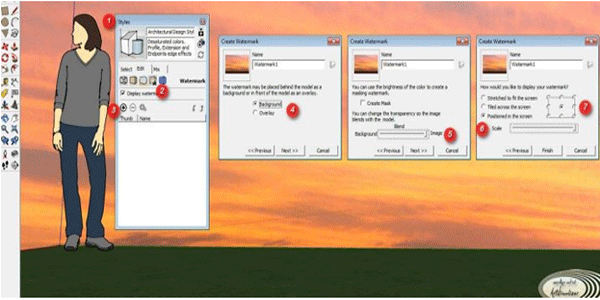
Here are the tips on how to change the background in SketchUp (not for render).
Usually when we want to present our SketchUp drawing to our client, it’s only a sky, isn't it? SO, with this way, we can change / customize our background so at least it will make our scene more real although it’s only a sketch without rendered.
If you want to render the scene (vray or podium or anything else render engine), then you should use HDRI or customize on Photoshop.
Usually when we want to present our SketchUp drawing to our client, it’s only a sky, isn't it? SO, with this way, we can change / customize our background so at least it will make our scene more real although it’s only a sketch without rendered.
If you want to render the scene (vray or podium or anything else render engine), then you should use HDRI or customize on Photoshop.
So, here is the step by step:
1. Show the Styles window by accessing menu Window -> Style.
1. Show the Styles window by accessing menu Window -> Style.
2. In window Style, choose tab "Edit", then choose "Watermark" from the menu
3. Click "(+)" icon then select a bitmap whatever you want to show for your background image, usually its a sky image or something else. The bigger the image size will make more smooth.
4. then, you will get a dialog question window, choose "Background". Then, "Watermark1" on the option can changed/renamed to whatever u want.
5. The next dialog, let the settings to the default, just click "Next".
6. Next dialog, choose "Positioned in the screen", then move the slider in the "Scale" to the right, This means our bitmap will strecthed fully. Thats why i suggest you use bigger image size so you will get smoother result.
7. Then, on the bullet icon, this means how the image repetition start. In this case, i select the bottom center. But you can select/try your own based on your image. Then, click "Finish"
Done.. ! ^_^ .. the parameter i mention above is not absolute, you can take your time to experience .. i hope this is useful for you ..
~~~~~~~~~~~~~~~~~~~~~
Published By
Arka Roy
www.sketchup-ur-space.com
~~~~~~~~~~~~~~~~~~~~~

