Showing posts with label free download sketchup plugin. Show all posts

Monday, June 2, 2014

Steps to Make SketchUp Run Smoother

  Tony Gushanas
  
SketchUp simplifies the entire process of creating models, but making various models can slow down the program. There are various steps mentioned below that can speed up SketchUp:


Components & Groups

Everything that is modeled must be either a component or a group. Ungrouped faces are great resource consumers and increase the file size significantly.

Display Style

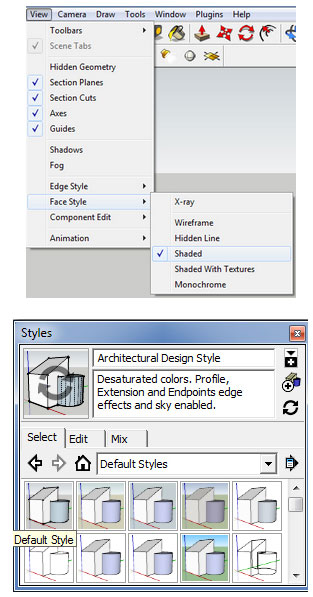
Under the View option, users should set their Face Style to Shaded and uncheck Shadows if they are currently on. They should also set their Windows>Style option to one of the defaults. If they require to view their model with a particular style and with shadows, they must set up a scene with those properties. User should ensure to set up a ‘working’ scene so that they can shift between the two. This process enhances the workflow and speeds up SketchUp significantly.
Steps to Make SketchUp Run Smoother 
Purge

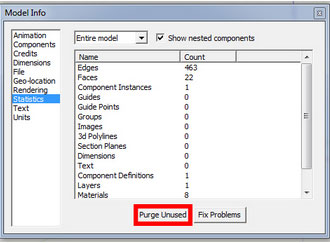
Each time a component is modeled, that component is saved by SketchUp inside file. Even if it is deleted, it is saved in a library for the user to recall whenever required. Though this is very helpful, yet it makes the file size extremely large, especially when components are imported from the online 3D warehouse. It is necessary that users visit Window>Model Info>Statistics>Purge Unused, periodically and watch their component count and file size decrease and feel SketchUp running faster.
Steps to Make SketchUp Run Smoother  

Layers

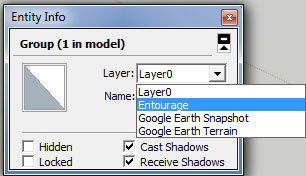
Users must put detail items that they do not require to see all the time on their own layer. This will help them to toggle these items off while they are working on their broader modeling strokes. It is important to be careful while using this one. Ii is recommended that users should model everything on their Layer0 and group up similar items using the outliner tool and manually change items from layer0 to their desired layer using the entity information tool bar i.e. Window>Entity Info.
Steps to Make SketchUp Run Smoother 

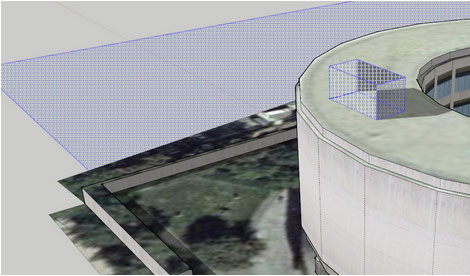
Hidden Geometry

Users can toggle to View>Hidden Geometry on and check if there are any hidden geometries they need to remove. Hidden geometry will show up with a crosshatch infill and removing these hidden geometries definitely speeds up SketchUp.
Steps to Make SketchUp Run Smoother  

Last Save with Minimal in View

To ensure that the files open quickly, users should make their last save count. They should make sure that shadows are disabled and any extraneous layers are toggled off.

~~~~~~~~~~~~~~~~~~~~~
Published by
Arka Roy
www.sketchup-ur-sapce.com
~~~~~~~~~~~~~~~~~~~~~

Wednesday, April 30, 2014

Debugging SketchUp Extensions Now Easier

Debugging is now no more a trouble for SketchUp Ruby extension developers. With a Ruby Debugger for SketchUp 2014, debugging has got easier.

The Ruby community enjoys debugging with Integrated Development Environments (IDE) like RubyMine, NetBeans and Aptana RadRails which usually rely on different gems to be installed for remote debugging. Getting these gems to work within SketchUp’s embedded Ruby is usually difficult. But now, at 3D Basecamp 2014, an open source Ruby debugger framework has been announced which currently supports Windows only but it is expected to support Mac soon. Installing it is very simple:

  • Copy SURubyDebugger.dll from GitHub into the SketchUp installation directory: C:\Program Files (x86)\SketchUp\SketchUp 2014.
To launch SketchUp with the following command line arguments must be followed:
  • SketchUp.exe -rdebug "ide port=1234"
  • The port must match the remote debugger port setting configured in the IDE.
  • SketchUp will start up and appear to be frozen while waiting for the debugger to show up.
  • Launch remote debugging in the IDE, SketchUp should continue running. It is required to observe breakpoints hit when Ruby code execution attains the specified lines.
If the user is not familiar with installing and configuring the IDEs, some step-by-step instructions can be attained from the GitHub repository wiki. The source code for this project hosted under our GitHub account is https://github.com/SketchUp/sketchup-ruby-debugger.

Debugging SketchUp Extensions Now Easier  

~~~~~~~~~~~~~~~~~~~~~~~
Published By
Arka Roy
www.sketchup-ur-space.com
~~~~~~~~~~~~~~~~~~~~~~~ 


Saturday, August 3, 2013

Sketchup plugin in 2013

Sketchup Plugin : CURVILOFT v1.2d

Curviloft facilitates sketchup users to extrude diversified 2d profile in plain ol sketchup with its Loft By Spline tool.

This plugin can make surfaces from contour lines. It has the similarity with SketchUp Sandbox. The plugin can easily create caves, pipes, etc. Requires installation of the plugin LibFredo V4.7a.

Downloadable link
Download: http://sketchucation.com/forums/viewtopic.php?t=28586


bim.bon for sketchup – A new plugin

A group of architects and programmers from Brazil develop this plugin with a view to empower the SketchUp for budgeting projects run on this platform. This plugin allows users to perform directly on the Internet or from the 3d model in Trimble SketchUp. Avail the huge collections of building materials and decoration containing products and prices updated. Download 3D models and for kitchen and bathroom products, doors, windows, floor, wall, structure, roof and much more.. The plugin is useful for making construction budget smoothly and instantly.


Downloadable link
http://www.bimbon.com.br/produtos

Super Section Sketchup plugin

Clark Bremer, Professional timber framer and former programmer, introduced this unique plugin useful for modeling timber frame. It can easily make 2D slices with model of timber framers like think bent sections and wall sections. The software has the capability to position the section cut on its own layer along with its own scene. The new layer is shown only in that scene but not in any prevailing scenes, or future scenes which you include.

The tutorial will be very useful for modeling timber frame designs in 3D.


~~~~~~~~~~~~~~~~~~

Published by Rajib Dey
Editor-in-chief
Sketchup-ur-space (An exlusive e-mazine for worldwide sketchup users)
Sketchup4architect (An information hub for sketchup communities)