Showing posts with label Video Tutorial. Show all posts

Thursday, March 19, 2020

Make a professional kitchen design with easysketchup kitchen design plugin

John Atkinson develops easysketch kitchen design plugin. This sketchup plugin is compatible with SketchUp 2015, SketchUp 2016, SketchUp 2017, SketchUp 2018.

This plugin can be used to generate professional kitchen design concept in sketchup. After being set up within SketchUp, it is possible to obtain an expansive library of kitchen components from the EASYSKETCH window.

In order to create a new kitchen design, set your designs options through drop down menu. Apply the filterable search to include a cabinet to your drawing. Units will be filtered based on your search criteria, as for instance ?drawer? will filter unit with drawers, ?oven? will filter units for ovens. To include the selected unit to the drawing space, click on the unit and it is automatically arranged at the existing cursor position.

The most striking feature of EASYSKETCH is to create design modifications rapidly. Right-click on a unit to obtain the EASYSKETCH sub menus where some vital shortcuts exist to parameters like Carcass material, Door handle, Frontal material, Worktop material other design options.

Planned content updates include new handle packs, worktop supplier swatches, door styles and pre-configured units groups. New content can be added simply from the Plugins>EasySketch>Manage Content window inside SketchUp.

Make a professional kitchen design with easysketchup kitchen design plugin

~~~~~~~~~~~~~~~~~~~~~~~~~~~~
Published By
Rajib Dey
www.sketchup4architect.com
~~~~~~~~~~~~~~~~~~~~~~~~~~~~

Monday, January 13, 2020

SketchUp to KeyShot 7 ? The newest sketchup extension

SketchUp to KeyShot 7 is newest sketchup extension that can be applied to export sketchup files to keyshot 7 and save out as .bip files.
This sketchup extension is compatible with SketchUp 7, SketchUp 8, SketchUp 2013, SketchUp 2014, SketchUp 2015, SketchUp 2016, SketchUp 2017, SketchUp 2018.
This extension combines SketchUp 3D modeling software and KeyShot 7 jointly on Windows or Mac OS X, in spite of arranging KeyShot inside the modeling application. This plugin attaches a menu button to your 3D software that transmits 3D data and other model information into KeyShot.
Given below, some useful features of it :-
Features:
? Retain colors and textures
? Supports SketchUp physics animations
? Recognize groups
? Export .bip
Requirements:
? SketchUp 2015 ? 2018
? KeyShot 7
? Windows 7,8,10 64-bit or Mac OS X 10.8 or later
SketchUp to KeyShot 7 ? The newest sketchup extension
~~~~~~~~~~~~~~~~~~~~~~~~~~~~
Published By
Rajib Dey
www.sketchup4architect.com
~~~~~~~~~~~~~~~~~~~~~~~~~~~~

Thursday, August 22, 2019

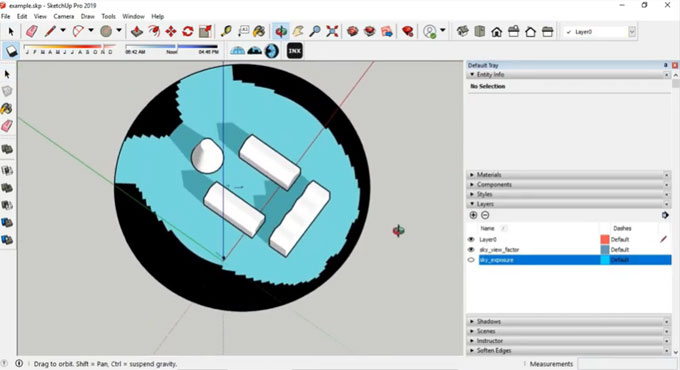
Sky View Analysis is the newest member in the extension warehouse

Sky View Analysis is an exclusive sketchup plugin that can be used to work out sky exposure and sky view factor.
SVF: Sky View Factor (SVFs) demonstrates the ratio at a point in space among the visible sky and a hemisphere centered over the analyzed location (Oke 1981).
• If SVF of a point is 0 the entire sky is barred from view through obstacles.
• If SVF of a point is 1 the whole sky is free from view through obstacles (ideal rural scenario).
A relation persists among Sky View Factor and Radiation.
for SVF = 0 :
1. there is no short-wave reflection
2. there is no long-wave nocturnal interference
for SVF > 0 :
1. incoming day-time short-wave reflection is raised throughout the day
2. outgoing night-time long-wave radiation is decreased
3. incoming night-time long-wave radiation is raised
4. altered soil heat flux
Features:
• Generate Sky Exposure Mask
• Generate Sky View Factor Mask
• Apply several times similar dome for Sky Exposure measurement
It belongs to an open source plugin and it is available in GitHub-AntonelloDN
For online demonstration, go through the following video tutorial.
Sky View Analysis is the newest member in the extension warehouse
~~~~~~~~~~~~~~~~~~~~~~~~~~~~
Published By
Rajib Dey
www.sketchup4architect.com
~~~~~~~~~~~~~~~~~~~~~~~~~~~~
Monday, August 19, 2019

Free update to the latest version of Twinmotion

Advent S.A. just introduced the updated version of Twinmotion that allows the users to transit from Sketchup Pro to VR instantly with some simple clicks of mouse. Besides, Twinmotion also contains a new series of high-quality grasses for creating realistic lawns and landscapes.
Twinmotion belongs to a superior quality, user-friendly real-time visualization tool for architecture, interior design, urban planning, and landscaping.
Given below, some exclusive features of newest version :-
SketchUp direct link: It now becomes easier to deal with SketchUp data easily and quickly with new one-click direct link synchronization with SketchUp Pro other than accessible direct links with ARCHICAD and Revit and automatic material replacement and geometry optimization.
Import time with the direct link is also accelerated as compared to import a SKP file. Besides, the issue with rendering is resolved with flipped faces. Now, the import method now handles properly with geometry that contains various materials on each side.
New high-quality grass pack: It is now possible to generate delightful lawns and realistic landscapes with a brand-new pack of grasses. The seven existing flowers are enhance with the addition of 25 new grasses.
Greater stability and performance: The consistency and rendering speed for imported data is significantly enhanced with the static mesh rendering pipeline. Some minor bugs are also resolved. Go through the release notes (login required) for more details.
This sketchup extension is available in www.unrealengine.com
To get online demonstration of the latest version, watch the following video tutorial.
Free update to the latest version of Twinmotion

~~~~~~~~~~~~~~~~~~~~~~~~~~~~
Published By
Rajib Dey
www.sketchup4architect.com
~~~~~~~~~~~~~~~~~~~~~~~~~~~~

Tuesday, August 13, 2019

Some new functionalities of FredoPortrait sketchup plugin

In this sketchup video tutorial, you will be familiar with some new features of FredoPortrait sketchup plugin to transform a complex 3D model into 2D FaceMe geometry.

FredoPortrait is a useful sketchup extension that can be used to generate custom camera views and export custom images from inside of sketchup.

The plugin comprises of a custom camera tool that saves and loads cameras captured from the viewport. Custom Cameras are preserved within the model or at Sketchup level, which create a way to move cameras across models.

Portrait Studio contains a wide array of tools which are used to identify a camera precisely and clarify the view depending on the selection. It then facilitates to create or update scenes, images in different formats, and more commonly render or export the selection with the native Sketchup exporters or 3rd party exporters. It also facilitates to create 2D Components out of selected 3D objects (for SU2018 and higher versions).

FredoPortrait is applied for the following purposes :

1. Move cameras inside a model and across models.
2. Create images and exports of the selection only
3. Create 2D components from selected 3D objects (for SU2018 and higher version)
4. Modify the camera positions and save them as scenes.


Most features are available in the FredoPortrait Studio dialog box.

To get online demonstration of this sketchup extension, go through the following video tutorial.

Read Continue

Some new functionalities of FredoPortrait sketchup plugin

~~~~~~~~~~~~~~~~~~~~~~~~~~~~
Published By
Rajib Dey
www.sketchup4architect.com
~~~~~~~~~~~~~~~~~~~~~~~~~~~~

Thursday, August 8, 2019

KG-dev - CADoptimus - Tag Manager 2019 – The newest sketchup plugin

This exclusive sketchup plugin is developed by KG Dev, the renowned developer of custom sketchup extensions.
The plugin is compatible with SketchUp 2017, SketchUp 2018 and SketchUp 2019.
By applying Tag Manager, the users can instantly assign numerous tags to any entity. As soon as few tags are included, one can search back those entities depending on 1 or more tags. It is a useful substitute to a workflow where one would normally utilize groups and layers to handle their drawing.
To download KG-dev - CADoptimus - Tag Manager 2019, click on the following link extensions.sketchup.com
To learn how this plugin works, go through the following video tutorial.
KG-dev - CADoptimus - Tag Manager 2019 – The newest sketchup plugin

~~~~~~~~~~~~~~~~~~~~~~~~~~~~
Published By
Rajib Dey
www.sketchup4architect.com
~~~~~~~~~~~~~~~~~~~~~~~~~~~~

Thursday, August 1, 2019

Demonstration of material replacer for sketchup

In this sketchup tutorial, you will get online demonstration of an exclusive sketchup extension called material replacer for sketchup.
Material Replacer is developed by Thomas Thomassen. It is used to swap out any material in your model with simple mouse clicks. It can substitute one material for another by choosing material in the model.
This sketchup extension is compatible with SketchUp 6, SketchUp 7, SketchUp 8, SketchUp 2013, SketchUp 2014, SketchUp 2015, SketchUp 2016, SketchUp 2017, SketchUp 2018, SketchUp 2019.
Menus & Toolbars
• Tools » Material Replacer
Requirements
• TT_Lib2 — 2.7.0
To learn the functionality of this extension, go through the following video tutorial.
One can download this extension from extension warehouse
Video Source TheSketchUpEssentials
Demonstration of material replacer for sketchup

~~~~~~~~~~~~~~~~~~~~~~~~~~~~
Published By
Rajib Dey
www.sketchup4architect.com
~~~~~~~~~~~~~~~~~~~~~~~~~~~~

Thursday, June 6, 2019

Click-Window 3D – The newest sketchup extension

Click-Window 3D is the newest sketchup extension available in extension warehouse. It is compatible with SketchUp 8, SketchUp 2013, SketchUp 2014, SketchUp 2015, SketchUp 2016, SketchUp 2017, SketchUp 2018, SketchUp 2019.

Click-Window 3D can be applied to generate 100% adjustable windows and french doors. From hung, sliding, french, panoramic to crank windows, all of these 3D windows are obtainable in PVC, wood and aluminium.

With click-window 3D, it is possible to perform with 3D models of superior quality to accomplish interior design projects efficiently and successfully.

Two versions are available in both metric and imperial systems.

How to use:

1. Click on the icon « START » on the Click-Window 3D Toolbar to import & insert the control panel.

2. Choose the icon « Interact with Dynamic Components » that is accessible on the toolbar, « Dynamic Components ».

3. Just click on the thumbnails of the « Control Panel » to fix the settings of your future Windows.

4. Import your 3D Window, with a drag and a click.

5. Wait for some times while the program is loading.

This sketchup extension is available in extension warehouse extensions.sketchup.com

For online demonstration, go through the following video tutorial.


~~~~~~~~~~~~~~~~~~~~~~~~~~~~
Published By
Rajib Dey
www.sketchup4architect.com
~~~~~~~~~~~~~~~~~~~~~~~~~~~~

Wednesday, May 15, 2019

DPLineStyler (1.0.1) for Sketchup

DPLineStyler is the newest sketchup extension that can be used to add styles in lines and curves with dashes, symbols or both.

It is well suited with SketchUp 2016, SketchUp 2017, SketchUp 2018, SketchUp 2019.

It functions locating lines already created and providing the consequent dashes and symbols into a group. While rubbing out or concealing your original lines, just the styled lines are departed.

If you are well experienced with layers, it is possible to track the similar original lines over with several styles (or the similar style at a diverse scale) and retain each style group in its own layer.

DPStyledLines can be fully modified. Apply any dash pattern and line color as per your choice. "Generate" your own symbols just by typing, or "Make" symbols from any group or component.

Your styles and symbols are saved in your Plugins folder, so that these can be applied on all your models.

DPLineStyler is available with some pre-made styles to start with. One can download a SketchUp sampler file of them by clicking on this link. (3dwarehouse.sketchup.com)

For live demonstration, go through the following video tutorial.

DPLineStyler (1.0.1) for Sketchup

~~~~~~~~~~~~~~~~~~~~~~~~~~~~
Published By
Rajib Dey
www.sketchup4architect.com
~~~~~~~~~~~~~~~~~~~~~~~~~~~~

Tuesday, April 16, 2019

AUGmentecture 1.0 – The newest sketchup extension

Zarik B has developed AUGmentecture, the newest sketchup extension available in extension warehouse. It is compatible with SketchUp 2016, SketchUp 2017, SketchUp 2018, SketchUp 2019.

AUGmentecture belongs to a service that allows you to observe complex 3D models on a mobile device in an Augmented Reality format. The AUGmentecture extension facilitates you to coherently and safely upload your 3D models directly from Sketchup to your AUG account to see them afterwards with your mobile device. You have to only choose the model and it is possible to view the model on your mobile device.

The purpose of AUGmentecture is to make augmented reality an indispensable design communication and collaboration tool for architects, designers, and artists.

One will be able to download the AUGmentecture app for iPhone from here (itunes.apple.com) or for Android Phone from here (play.google.com).

Go through the following video tutorial, to get more clear idea.

Video Source AUGmentecture

AUGmentecture 1.0 – The newest sketchup extension

~~~~~~~~~~~~~~~~~~~~~~~~~~~~
Published By
Rajib Dey
www.sketchup4architect.com
~~~~~~~~~~~~~~~~~~~~~~~~~~~~

Monday, April 8, 2019

Some handy tips to create realistic materials in Lumion

This exclusive Lumion tutorial is presented by Minh from Architecture Inspirations. The tutorial focuses on some crucial tricks to generate realistic materials in Lumion.
Applying materials is a vital feature to perform in Lumion. If there are not the simplest material assigned to a surface while importing the 3D model in Lumion, it is required to apply Lumion’s materials.
The materials should be used to each surface; these materials range from simple colors or a material with diffuse texture. Initially, a model is created in sketchup and brought to Lumion through Lumion LiveSync.
Lumion LiveSync is a useful sketchup extension that can be used for real-time, photorealistic rendering of your SketchUp model. It is possible to visualize your sketchup model in Lumion’s real time surroundings. Besides, instantly set up a live connection for concurrent modeling & rendering.
In Lumion materials library, there are 1019 materials as follow :-
a. Landscape (soil, water, rocks, grass etc.)
b. Interiors (fabric, glass, leather, metals, plastics, etc)
c. Exteriors (concrete, bricks, roofing, asphalt, wood etc.)
To learn how to produce realistic materials in Lumion, watch the following video tutorial.

~~~~~~~~~~~~~~~~~~~~~~~~~~~~
Published By
Rajib Dey
www.sketchup4architect.com
~~~~~~~~~~~~~~~~~~~~~~~~~~~~

Monday, March 4, 2019

s4u Stair – The newest sketchup extension

Huynh Duong Phuong has developed s4u Stair. It is a newest sketchup extension that is used to create stair, ramp from faces. The plugin is compatible with SketchUp 2016, SketchUp 2017, SketchUp 2018, SketchUp 2019.

To enhance the speed, the following shortcuts are used :-

Ctrl (Alt on Mac) + Select Point > Set Heigth Stair
Ctrl (Alt on Mac) + Select Face > Set Landing
Tab > Reverse Direction Stair


Double Click on Screen ( or Right Click) > Set Parameter
Double Click on Face > Set Index,Landing.
Double Click on Face (1 Selected Face)> Change Start Edge
Explode all curve, make curve for start step and end step.


This sketchup plugin is available in extension warehouse.

For online demonstration of the plugin, go through the following video tutorial.


Video Source: Suforyou Sketchupforyou

~~~~~~~~~~~~~~~~~~~~~~~~~~~~
Published By
Rajib Dey
www.sketchup4architect.com
~~~~~~~~~~~~~~~~~~~~~~~~~~~~

Tuesday, February 26, 2019

CompoTools⠀CompoScene 2.0.6 for sketchup

Rafael Rivera has developed the most updated version CompoTools CompoScene i.e. version 2.0.6 for sketchup users. It is useful sketchup extension compatible with SketchUp 2017, SketchUp 2018, SketchUp 2019.

The purpose of this sketchup plugin is to generate and export sketchup scenes with rendering channels for composing in photoshop or other leading painting app.

This sketchup is very useful for comic book artists and manga artists to create stunning 3D backgrounds in their panels. The artists can create a mock-up of the scene to be produced with various camera angles for several panels.

CompoScene produces rendering channels for the users to build upon and develop your own art style.

This sketchup plugin is available in extension warehouse.

To watch online demonstration of the plugin, go through the following video tutorial.

Video SourceCompoTools

~~~~~~~~~~~~~~~~~~~~~~~~~~~~
Published By
Rajib Dey
www.sketchup4architect.com
~~~~~~~~~~~~~~~~~~~~~~~~~~~~

Thursday, February 21, 2019

BoxUp XYZ 1.3.0 for sketchup

BoxUp XYZ is the newest sketchup plugin that is well matched with SketchUp 2017, SketchUp 2018, SketchUp 2019. It is only compatible with windows platform.
BoxUp expands Sketchup Dynamic Components with Dynamic Materials, Costing, Lists and includes 14 new dynamic functions. It will be very effective while working with sheet/profile based modular systems like; Kitchens, Office furniture, Shelving, Wardrobes, Aluminium profile systems and so on.
Sheet based materials range from MDF, Plywood, Glass, Acrylics - any sheet based system.
Linear based materials like Aluminium profiles, Edgeband, gaskets - any profile based system.
Create your own collection of components or make collections for a client. BoxUp Pro comprises of a wide array of collection of dynamic components for kitchen design. It can be applied as reference, as a base to build your own.
The plugin includes 14 new functions to Dynamic Component, that allows and streamlines the process for creating more complicated component collections.
Go through the following video tutorial for online demonstration of the plugin.

~~~~~~~~~~~~~~~~~~~~~~~~~~~~
Published By
Rajib Dey
www.sketchup4architect.com
~~~~~~~~~~~~~~~~~~~~~~~~~~~~

Tuesday, January 22, 2019

How to convert sketchup scenes into layout viewports

Sketchup is applied to make scenes and styles to arrange a model to proper layout. In this exclusive sketchup video tutorial, you will learn how to utilize those scenes to generate viewports in layout as well as align your model efficiently among scenes.
With layout, it becomes easier to accomplish all the view-related tasks (styles, viewpoints, section planes, scenes, layers etc. from inside LayOut and to apply SketchUp primarily for the “raw” modeling.
There is another useful command like center scene inside viewport to simplify the task.
As soon as you get the scenes in your model set, inside Layout go to File>Insert and navigate to your sketchup file in the browser. Click on your blank paper in Layout and a new viewport will be seen. It is possible to modify the viewport to your scene by right clicking on the new viewport and scroll through to the scenes in the menu.
To learn the detail process, go through the following video tutorial.

Video Source SketchUp

~~~~~~~~~~~~~~~~~~~~~~~~~~~
Published By
Arka Roy
www.sketchup4architect.com
~~~~~~~~~~~~~~~~~~~~~~~~~~~

Tuesday, January 15, 2019

Tips to create column in sketchup quickly

In this sketchup tutorial, you will learn some useful tips to create the model of a column by applying various sketchup plugins like Curviloft, JHS Power Bar, True Bend, Fredo Scale, Sketchy FFD.

The details of these plugins are given below :-

Curvilotft – This sketchup plugin is used to make surfaces from curves or contours by lofting & skinning.
Loft by attaches individual contours, open or closed, with smooth splines.
Loft along Path attaches contours, along a specified rail curve.
Skinning makes surfaces confined by 4 or 3 contiguous contours.
JHS Power Bar - This tool comprises of a series of powerful extensions from other developers, like TIG, Thom Thom, Rick Wilson, Christina Eneroth, and more.


Some of the useful functionalities of the tool set are given below :-

Softening and unsoftening hidden geometry.
Extrude a face whereas still keeping it upright.
Fll in faces on coplanar edges for a selected set of geometry.
Offset a single edge object in SketchUp.
Extrude an individual line into a 3D shape.
TrueBend – It is used to bend instances to a specified degree, without changing the original length of the reference segment. Presently the reference segment refers to the bottom front of the boundingbox.
Fredo Scale – This plugin allows you to orientate the selection box around a set of objects and internationally employs a number of geometric transformations, like Scaling, Tapering, Stretching, Plane Shear, Twisting, Bending and Rotation.
Sketchy FFD – This sketchup pluign is used to include a control cage to an object that facilitates the mesh to be maneuvered through control points.


To learn the complete process to make column in sketchup, go through the following video tutorial.

Video Source Tutorials Up

Tips to create column in sketchup quickly

~~~~~~~~~~~~~~~~~~~~~~~~~~~
Published By
Rajib Dey
www.sketchup4architect.com
~~~~~~~~~~~~~~~~~~~~~~~~~~~

Tuesday, January 8, 2019

A position is vacant for Architectural Project Manager/Architectural Designer in USA

Chandler Pierce Architect, a New York City-based firm having more than 25 years of experience in the practice of architecture, is inviting applications for the position of Architectural Project Manager/Architectural Designer having 2-4 years of working experience in architecture or interior construction.

The prospective candidate has to mainly deal with an important client at the job site and working on projects that require high-end renovation and new construction. The suitable candidate should contain a sound aspiration to learn carefully and practical experience in different facets of architecture. The candidate should have the capability to draft quickly, assess to organize tasks, and offer an adjustable work style.

DUTIES & RESPONSIBILITIES:

a. It is full time work. A standard office week is M-F and 40 hours.
b. Travel to and deal with showroom job sites in most important US cities.
c. Practical working knowledge to create designs and ideas materialize.
d. Start off and execute in various tasks like architectural design, project management, researching, and drafting in a quickly manner.
e. Organize construction documents, NYC permit sets, and give general support to team-members.
f. Be competent, organized, and detail oriented at the time of presenting strong design and drafting skills.
g. Ability to handle construction projects from preliminary design stage through to final execution without any support.
h. Confidently and efficiently collaborate with the construction team on job sites and provide solution to construction dilemmas when they occur.


REQUIREMENTS:

1. Entitled to work in the United States.
2. An Undergraduate degree along with a Graduate degree in Architecture is preferable.
3. Strong communication (both verbal and written), listening, and follow up skills.
4. Fluent in written and spoken English.
5. Well versed with handling clients.
6. Knowledge of building materials and construction practices
7. Good knowledge in Vectorworks/AutoCAD, Rhino, SketchUp.
8. Mac savvy.
9. Friendly behaviour.


To get more clear ideas, go through the following video tutorial.

It is mandatory to have knowledge in Revit, 3D modeling, drafting by hand or Adobe Suite. Added advantages will be given for the candidates who have good experience with Vectorworks.

BENEFITS: Competitive salary with health care benefits, IRA, vacation time, holiday pay and personal time off/paid sick leave.

Process for sending application: To apply, send email to architalent2019@gmail.com with subject line “Architectural Project Manager”. Please include cover letter, resume, (2) references and work samples. In the (1) page cover letter, briefly answer the following:

a. What experiences do I have to offer Chandler Pierce Architect?
b. What do I hope to experience at Chandler Pierce Architect?
c. Where do I see myself in 5 years?


A position is vacant for Architectural Project Manager/Architectural Designer in USA
Read more
~~~~~~~~~~~~~~~~~~~~~~~~~~~
Published By
Rajib Dey
www.sketchup4architect.com
~~~~~~~~~~~~~~~~~~~~~~~~~~~

Saturday, December 15, 2018

OpenCutList – The newest sketchup plugin added to the extension warehouse

OpenCutList is an useful sketchup plugin that is newly added to extension warehouse group. It can be used to automatically create the cut lists and cutting diagrams for any woodworking projects.

The plugin is compatible with SketchUp 2014, SketchUp 2015, SketchUp 2016, SketchUp 2017, SketchUp 2018.

This extension opts for the current selection or the complete scene when there is no selection and generates a list of parts containing quantities and sizes. The extension arranges the parts by material attributes with several sorting options.

The cut list can efficiently deal with Solid Woods, Sheet Goods and Dimensionals.

It is possible to directly print the "cut list" from the part list dialog or export it as a CSV file.

Cutting Diagrams are produced from Sheet Goods parts.

The development of this extension is connected with the Community Driven sharing platform project : L'Air du Bois. This extension is Open Source and accessible under GNU GPLv3 license on GitHub.

Caution : Update from the Extension Manager dialog in Sketchup do not work for 1.4.0. You need to uninstall the older version first.

New from 1.5.0 :
Cutting Diagrams for parts with material of type Sheet good.
New from 1.4.0 :
New material type : Dimensional
Highlight a part in the model directly from part list.
New from 1.3.0 :
Extension now supports resized components instances. It performs in a superior manner with Dynamic Components.


The extension is available in extension warehouse.

For online demonstration, go through the following video tutorial.

OpenCutList – The newest sketchup plugin added to the extension warehouse

~~~~~~~~~~~~~~~~~~~~~~~~~~~
Published By
Rajib Dey
www.sketchup4architect.com
~~~~~~~~~~~~~~~~~~~~~~~~~~~